
Whether you’re a construction tradesperson, electrician, landscaper, or similar, you use a variety of software programs every day to manage your projects—quotes, invoices, and so on. Unfortunately, these tools don’t always communicate with each other, forcing you to tediously re-enter data and juggle multiple applications. This situation wastes precious time and increases the risk of errors. What if all your software and applications could automatically share your information? That’s exactly what the integration of Techtime with the Zapier. By connecting Techtime to your other software, you centralize and synchronize all your data. You automate your processes, resulting in that’s smoother, more productive, and above all, more reliable!
Let's find out how Zapier can connect Techtime to any software in your digital ecosystem, as long as it also offers a Zapier integration.
Zapier is a “no-code” automation platform (requiring no coding) that serves as a a bridge between various online applications. Specifically, Zapier allows you to create “Zaps”—that is, automated workflows where an action in one app automatically triggers an action in another. You don’t need to know how to code: all it takes is a few clicks to connect your apps and specify which data to transfer.
Zapier connects to more than 8,000 apps worldwide, covering everything from customer management and invoicing to spreadsheets, email, and more. Zapier runs 24 hours a day in the background: as soon as an event occurs in App A (for example, “a new quote is approved”), it performs the corresponding action in App B (for example, “automatically create a new project in Techtime”).
Good news for Techtime users: our software is part of the Zapier ecosystem. In other words, Techtime can automatically connect with virtually any other software via Zapier. Do you already use a business invoicing or quoting tool? A CRM? A field form app? You can sync it with Techtime in just a few clicks, without any custom development. Zapier serves as auniversal interface so that Techtime can “communicate” with your other applications and exchange data in both directions. This interoperability opens up immense possibilities for optimizing your workflow.
Mettre en place des “liaisons” entre Techtime et vos logiciels existants présente de nombreux bénéfices, aussi bien pour la productivité de vos équipes que pour la satisfaction de vos clients. Voici les avantages principaux dont vous allez pouvoir profiter :
Flexibility and scalability without extensive development: With Zapier, you can easily connect or disconnect apps as your needs change. Adopting new quoting software? Chances are it’s already in Zapier and can be connected to Techtime in just a few minutes. You’re no longer locked into a rigid ecosystem: you choose the best tools for each function (quotes, CRM, accounting, etc.) while keeping them interconnected. This avoids costly custom development or having to completely switch software just to get an “all-in-one” solution. In short, you build your ideal ecosystem, and Zapier seamlessly connects them all.
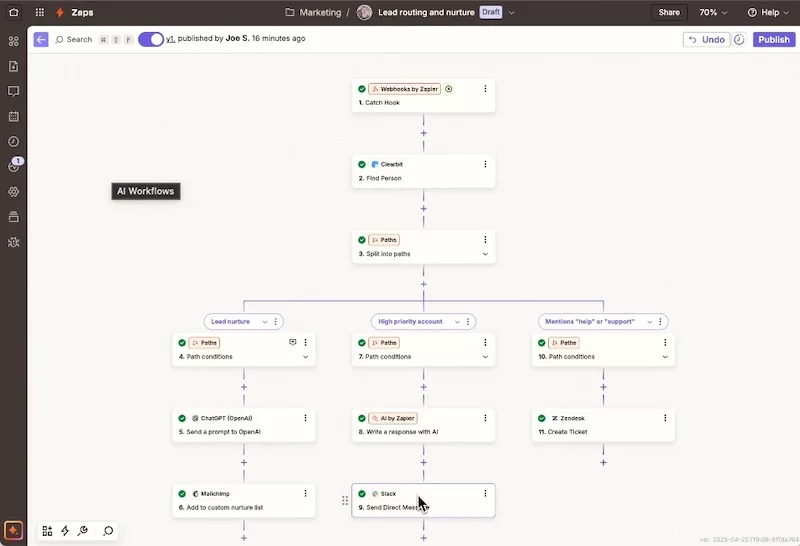
To illustrate this better, here are a few practical use cases for integrating Techtime via Zapier. These examples show how various construction industry apps can communicate with Techtime to streamline your day-to-day management:
These examples are just a glimpse. In reality, as long as you have two apps you’d like to see work together, there’s a good chance Zapier can make it happen. Techtime offers many “triggers” and “actions”in Zapier (new contact created, job site updated, create a service call, etc.) that let you build a wide variety of integration workflows tailored to your way of working. The key: automate to make your life easier !

De plus, en adoptant ces outils connectés, vous valorisez l’image d’une entreprise moderne et innovante, y compris lors de réponses à des appels d’offres. La digitalisation est de plus en plus encouragée dans le BTP pour gagner en productivité et en fiabilité. Montrer que vous utilisez un logiciel de chantier collaboratif (Techtime) interfacé à vos autres systèmes prouve que vous avez mis en place une organisation efficace et à la pointe. Cela peut vous différencier de la concurrence et rassurer vos prospects sur votre capacité à bien gérer leurs projets (suivi rigoureux, moins de risque d’erreurs, etc.).
Finally, from the perspective of SEO and online visibility (if you run a blog or a website showcasing your services), mentioning these integrations and your company’s digital transformation can enrich your content. Terms such as construction software, connected construction site management, Zapier integration, construction quotes and invoices are keywords searched by other professionals looking for solutions. Promoting your innovative tools can attract the attention of potential partners or clients who type these keywords into search engines. By positioning your company as an authority on these topics, you establish yourself as a thought leader and demonstrate your digital expertise.
Au-delà des aspects techniques, connecter Techtime à vos autres logiciels représente un vrai levier de développement pour votre entreprise du BTP. En optimisant vos processus internes, vous améliorez mécaniquement votre qualité de service envers vos clients. Par exemple, un client reçoit plus rapidement ses devis et factures, car tout est bien synchronisé et rien n’est oublié entre le terrain et le bureau. Vous pouvez le tenir informé en temps réel de l’avancement de son chantier (grâce aux notifications automatisées), ce qui renforce la confiance et la transparence. Une entreprise réactive, qui ne “laisse pas traîner” les formalités administratives ou les communications, marque des points en satisfaction client, un argument de poids pour la fidélisation et le bouche-à-oreille positif.
In summary, Integrating Techtime with your other software via Zapier allows you to take a giant leap forward in digitizing your construction business. You’ll benefit from a seamless workflow, where every piece of information flows automatically from the initial quote through site monitoring to the final invoice. You no longer waste time re-entering data or cross-checking information from different sources: everything syncs for you, almost magically! Your projects are better managed, your clients are better served, and your team is less stressed by administrative tasks.
As specialists in digital technology applied to the construction industry, we strongly encourage you to explore these integrations. Implementation is quick and risk-free (Zapier offers free trials, as does Techtime). Start with a small automated workflow—for example, creating a Techtime project from an accepted quote—and see the difference right away.
Vous avez une question ou besoin d’aide pour connecter une application spécifique à Techtime ? Notre équipe se tient à votre disposition pour vous accompagner pas à pas.
Profitez-en pour donner à votre entreprise les outils de sa croissance : moins de tâches manuelles, plus de chantiers menés de front ! En connectant Techtime à vos logiciels, vous choisissez la simplicité, l’efficacité et l’innovation au service de vos chantiers BTP. 🚀

EcoGreen est spécialisée dans le bâtiment avec des équipes de pose et de commerciaux.
I was already very satisfied with Techtime, which allowed me to efficiently manage schedules and projects. But with the integration of Zapier, we’ve really taken things to the next level: I can now automate job scheduling based on our purchase orders generated on Kizeo. All I have to do is assign the technicians, and everything else falls into place naturally.
Today, it’s a real winning combination: Kizeo, Techtime, and Zapier.
I would like to sincerely thank Grégory Toucas for his support, as well as the entire Techtime team for their attentiveness and responsiveness.