Worksite plans and documents
Add the plans, technical documents or other files the activity needs. The teams concerned can view them on their phone on the worksite.
Plan your teams, organise your roofing worksites and missions, then pass on plans, instructions and field information with Techtime.
A roofing company has to juggle worksites scheduled over several days with more one-off missions: leak detection, repairs, replacing components or inspections after bad weather.
With Techtime, bring these activities together in one schedule and assign the roofers involved. Each team then finds the information needed for its mission on its phone.
New build, roof renovation or repair: durations, teams and constraints are not the same.
Techtime lets you plan each activity with its dates and staff, then adjust assignments when a worksite falls behind or a mission needs to be added to the schedule.
You keep a view of the planned work without losing sight of the other worksites already under way.
A roofing worksite may involve your teams at several points: preparation, stripping, laying the roof covering, zinc work or finishing. In Techtime, organise these stages as activities and assign the roofers involved.
For each mission, add the information needed: address, times, instructions, plans, documents or useful worksite details.
The weather or the progress of other work forces a delay? Change the relevant dates in the schedule and reorganise teams without losing sight of the other worksites already planned.
This organisation clearly distinguishes the different missions planned on the same roof and gives each team the information that matches its visit.
Roofers then find their schedule and the useful information on their phone before their mission.
Between the office and the roof, roofers need to find the information for their mission quickly. Techtime links it directly to the scheduled activities.
Add the plans, technical documents or other files the activity needs. The teams concerned can view them on their phone on the worksite.
Specify in the instructions how to access the building, the roof area concerned or any practical information needed before the team arrives.
Add photos from the field to show the condition of an area, document the work done or flag an issue needing further work.
A finish still needs doing or a second visit is required? Add the details to the relevant activity so the next team finds the worksite context.
Roofers can enter their time on the activities they are assigned to. You see the hours reported for the different missions carried out on the worksite.
Roofing often takes place on a worksite where several companies follow one another. The progress of the roof structure, masonry work or work planned after the building is made weathertight can change when your roofers need to be on site.
With Techtime, several companies can work on the same worksite while each keeps its own environment.

Depending on the rights granted, view the information shared by other participants before mobilising your team. A report, a photo or a schedule change can help you check that the area is ready for your work.
You then adapt your own activities and assignments without mixing your company’s internal organisation with that of the other participants.
Once a stage is finished, add the photos, documents or information needed for the rest of the worksite. Authorised partners get a more precise picture of the work done before their own visit.
This makes it easier, for example, to move from roof structure to roofing and other trades.
Discover worksite sharing between companies.
A roofing worksite may keep your teams busy for several days, while a repair may only take a few hours.
When these missions are organised as separate activities in Techtime, roofers can enter their time on each one. You see the hours reported per worksite and per mission.
This data then makes it easier to compare the time scheduled with the time actually spent on the work.
Discover construction attendance sheet management.
Already using software to produce your roofing quotes, manage your invoices or price your work? Techtime works alongside it to organise teams and track how worksites are carried out.
You can keep your sales management tools while using Techtime for scheduling, field information and activity tracking.
If some data needs to flow between the different programs, a connection or specific adaptation can be considered depending on their technical possibilities.
Discover the options for adding custom features.
From the schedule, assign the roofers involved and add the information needed: address, times, roof area, instructions and useful documents.
For a one-off repair as for a renovation worksite, the team finds the information linked to its mission before arriving on site.
A repair needs adding or a worksite moving? Adjust the schedule and assignments while keeping a view of the other work already planned.
Discover our construction scheduling software.
From their phone, roofers check their schedule and the documents linked to the work. They can also add photos, send comments and enter their hours.
The manager has information straight from the field to track what has been done and prepare any second visit.
Discover the construction worksite tracking app.
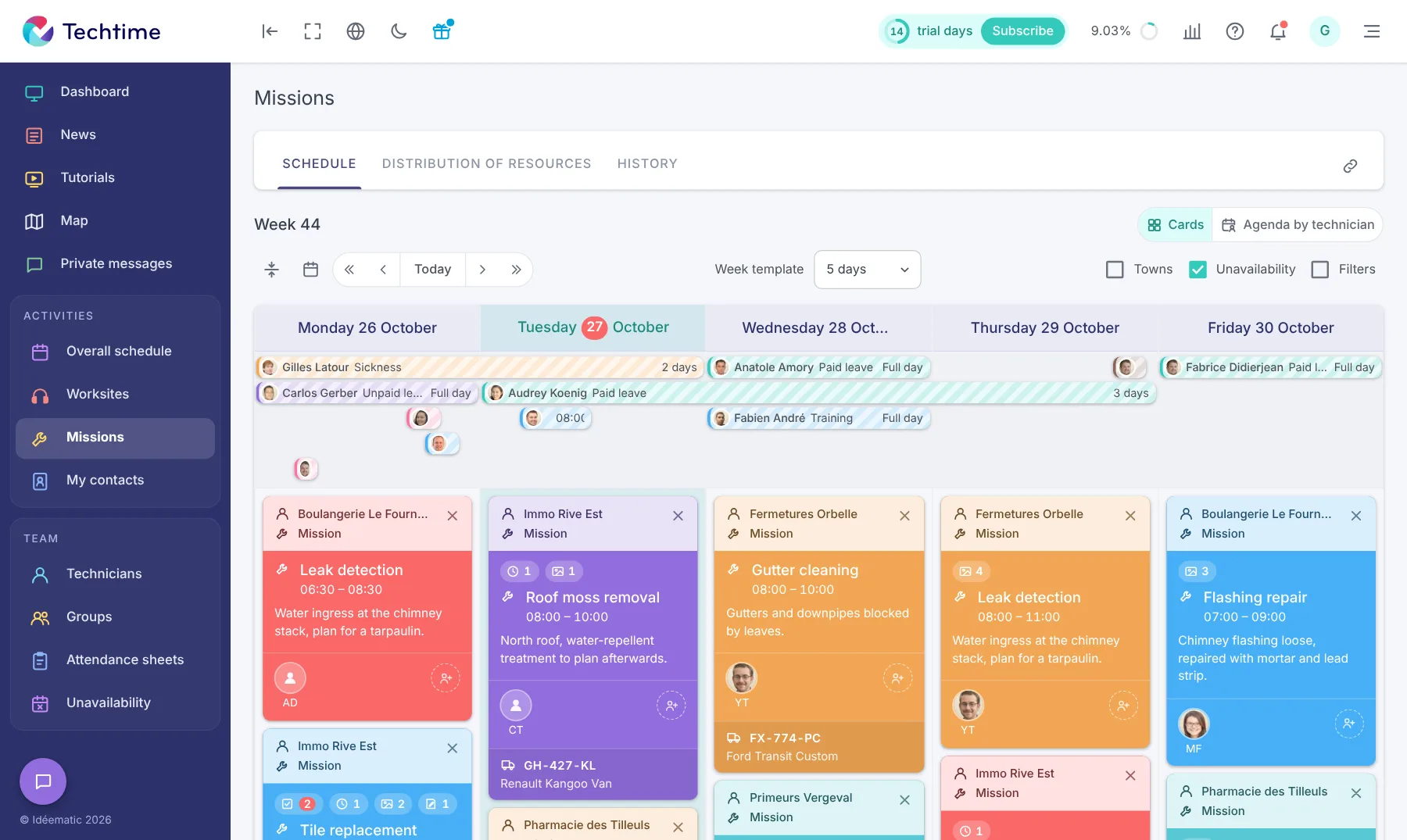
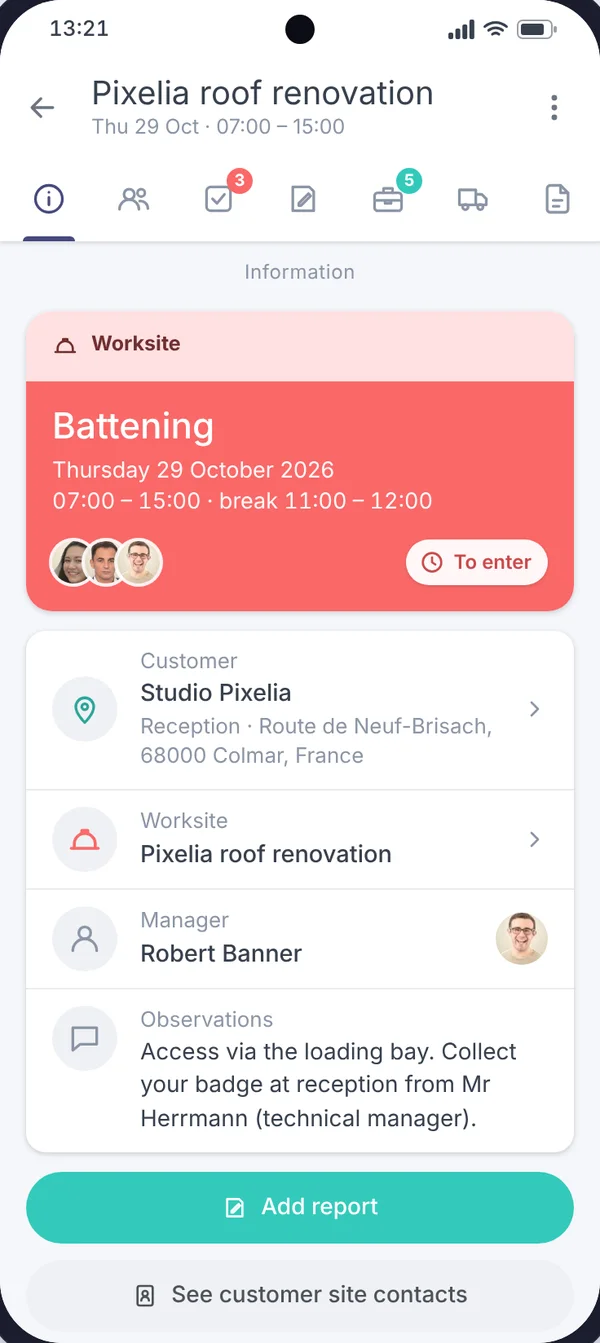
A roofing worksite can change with the weather, the progress of the work or an urgent call-out. Techtime lets you reorganise teams while keeping the information linked to each worksite.
Ready for your company’s digital transformation? We support you with software designed for you and your trade’s challenges.
Choose Techtime, worksite management software that is simple to use, and boost your productivity!
Plan roofing work, one-off repairs and the teams assigned to each mission.
Your roofers find the instructions, documents, photos and information linked to their worksite on their phone.
Centralise reported time, field feedback and the information needed to prepare the next stage of the work.
No commitment, and you gain your superpowers: 14 days to try Techtime with your teams.




Plan your worksite and mission activities, then set each one up in a click.
Book your live demo
