

After a job, the customer wants to know what was done. So does the office, to invoice, plan the next steps and answer the next call. The service report is the document that makes that link. Well written, it reassures the customer, protects the business and avoids unnecessary return visits. Here is what it should contain, a structure template you can reuse and the mistakes to avoid.
In brief
The service report (or job report) describes what a technician found and did during a visit: reason, diagnosis, work, parts, duration, photos, recommendations and follow-up, with the customer’s signature. It should be written on site, in simple, factual sentences. On mobile, it reaches the office immediately, linked to the job, which speeds up invoicing and the scheduling of follow-up work.
1What is a service report?
The service report is the written account of a technical visit to a customer: breakdown, maintenance, installation, inspection or repair. It tells the story of the job from the technician’s point of view: what they found on arrival, what they did, the condition in which they left the installation and what remains to be done.
It differs from the job sheet, which is shorter and whose main role is to certify the visit and collect the customer’s signature. On a worksite lasting several days, we tend to speak of a site meeting report. In small businesses, these documents often merge into one: what counts is that it is complete.
2Why take care over your service reports?
They understand what was done, why, and what they need to plan next
A dated, signed record in the event of a dispute or complaint
Faster invoicing, follow-up scheduled, history ready for the next visit
A vague report (“job done, nothing to report”) is useless on the day the customer disputes the work, a colleague takes over the file or the invoiced time has to be justified. Conversely, a precise report becomes a sales argument: the customer sees how seriously the work was done, and the additional quote proposed at the end of the report has every chance of being accepted.
3What should a service report contain?
The content varies by trade, but the same framework always appears, in seven sections.
Identification
Customer, job address, date, start and end times, break time, name of the technician or technicians. This is what links the report to the right job and lets you calculate the time spent.
Reason and findings
The customer’s initial request, then what the technician observed on arrival: symptom, condition of the installation, cause identified. A “before” photo is often worth more than a long paragraph.
Work carried out
The operations carried out, in order, with the parts replaced and the supplies used. If the office had prepared a task list, note which tasks were completed.
Outcome
The condition in which the installation is left: back in service, tests carried out, measurements taken where applicable, area cleaned. An “after” photo completes the record.
Recommendations and follow-up
What remains to be done: a new job, a part to order, a quote to draw up for additional work. It is the section most often forgotten, yet the most useful to the office.
Observations
Difficulties encountered (access, missing equipment, customer absent), risks spotted, any reservations from the customer.
Signatures
The customer’s, with their name, and the technician’s. They validate the content of the report and the end of the job.
4A service report template you can reuse
Here is a simple structure that can be adapted to most building, maintenance and technical service trades. The example is fictitious and for illustration only.
| Section | Example |
|---|---|
| Customer and address | Le Comptoir restaurant, 12 rue des Lilas, kitchen |
| Date and times | Tuesday, 8:00 – 10:30 am, break 0 min |
| Technician | Paul M. |
| Reason | Repeated tripping on the cold room circuit |
| Findings | Damaged power cable behind the evaporator, signs of overheating |
| Work carried out | Replacement of the cable section, check of the circuit breaker, operating tests |
| Outcome | Circuit back in service, no tripping during a 30-minute test |
| To plan | Quote for replacing the ageing distribution board |
| Observations | Difficult access behind the evaporator, send two technicians next time |
| Signatures | Customer (first and last name) and technician |
Good to know
Write for someone who wasn’t there: the customer, but also the colleague who will pick up the file in six months. Short sentences, facts, figures where there are any. Avoid internal abbreviations and value judgements (“rotten installation”): the report may be read by an expert or an insurer.
5The mistakes that make a report useless
- Writing it in the evening, from memory. Times become approximate, details disappear.
- Being too vague. “Repair done” says nothing about the cause, the solution or what to keep an eye on.
- Forgetting the follow-up. The additional quote mentioned verbally to the customer is never sent.
- Keeping photos separate from the report. Left on the technician’s phone, they cannot be found on the day they are needed.
- Not getting it signed. Without a signature, the report loses much of its value in the event of a dispute.
6Writing the report on mobile, during the job
Most of these mistakes come from paper and re-keying. With job management software that includes a mobile app, the report is filled in on site, within the job itself: the customer and address details are already there, and the technician only has to add what they did.
In the Techtime mobile app, each job has a Report tab. The technician enters the start time, end time and break time, writes their report and specifies what needs to be planned: a new job, a new activity or a new quote. The customer signs on the screen, with their first and last name, then the technician signs in turn.
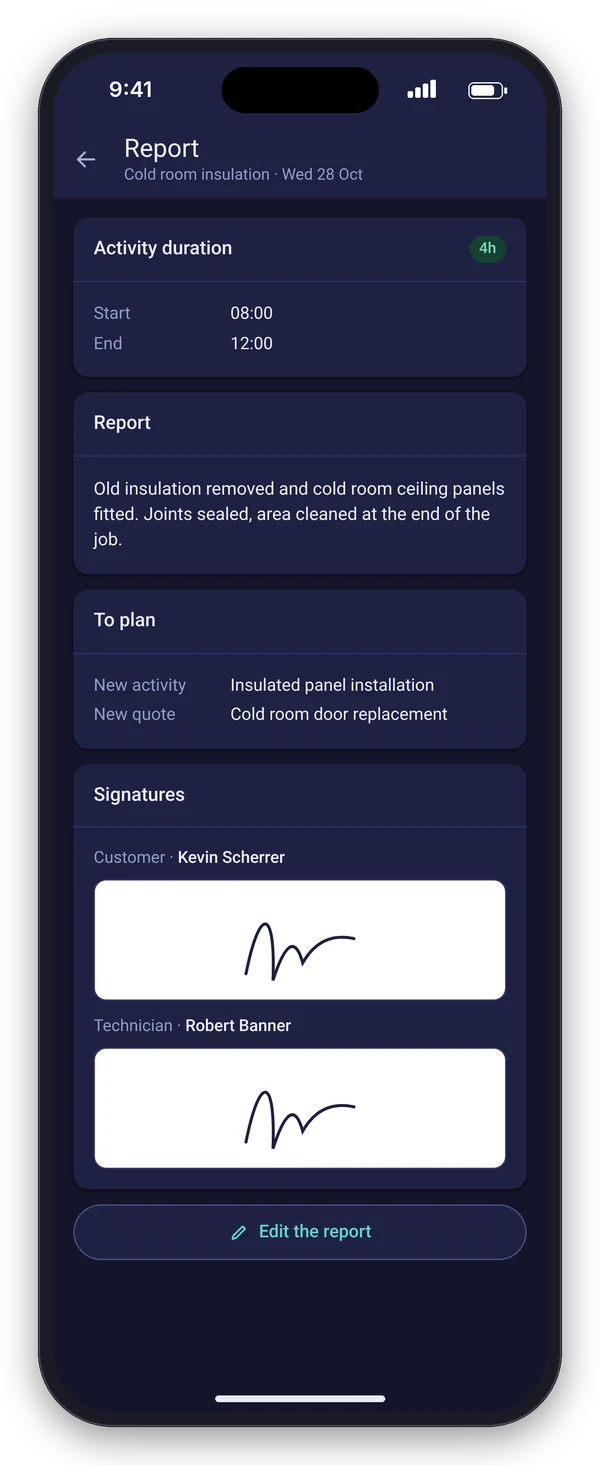
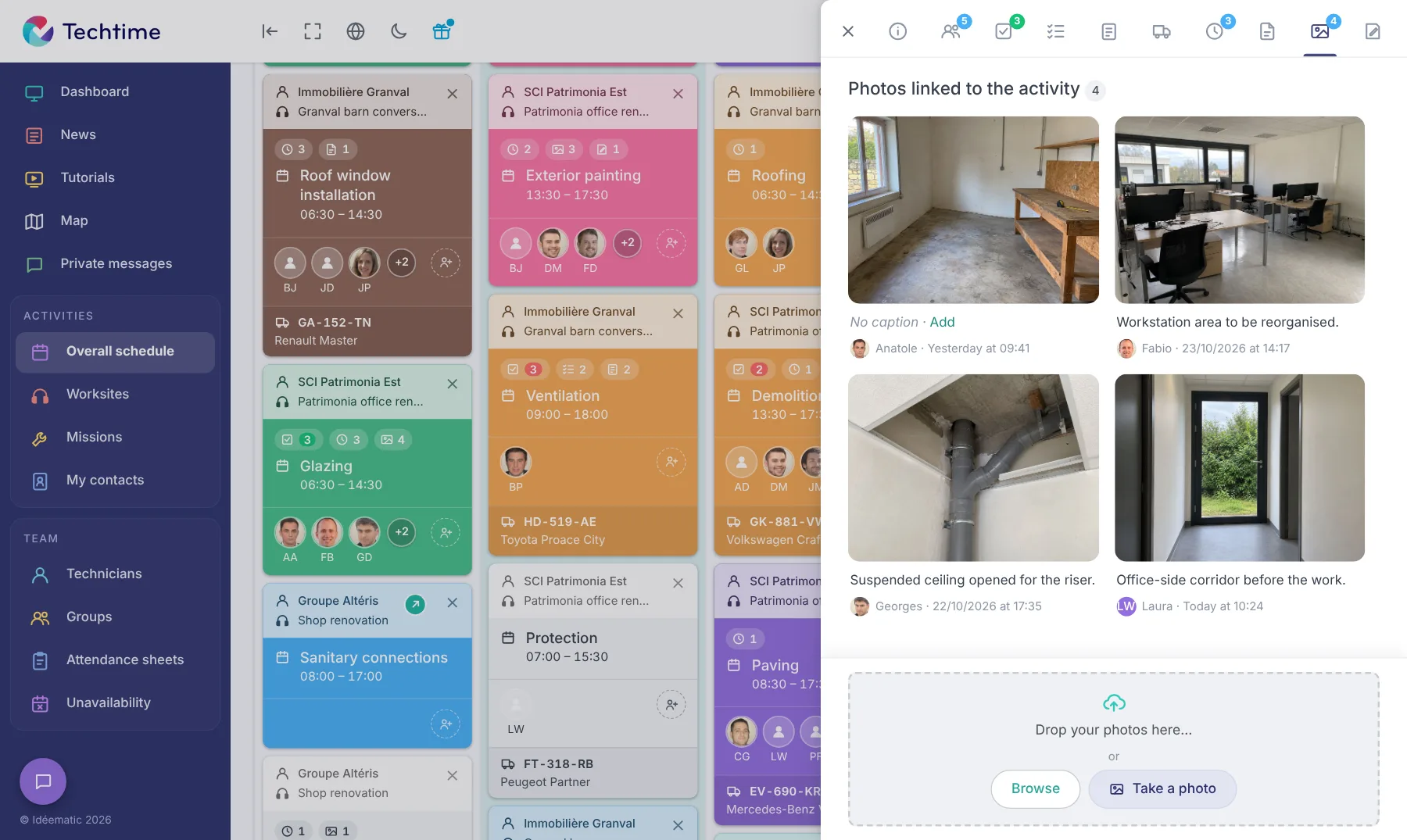
Ticked tasks, photos and recorded hours are linked to the same job. At the office, the report is available as soon as it is saved: follow-up work can be scheduled without waiting for the technician to come back, and the address history keeps a record of every visit.
Key takeaways: the service report checklist
- Customer, address, date, times and technician.
- Reason for the call and findings on arrival, with a photo.
- Work carried out, parts and supplies.
- Outcome and condition of the installation on departure, with a photo.
- Follow-up: job, order, quote.
- Observations and any reservations.
- Signatures of the customer and the technician.
FAQ
Who writes the service report?
The technician who carried out the job, on site and before leaving. They are the one with the exact information. The office then reviews it and organises the follow-up.
Is a service report mandatory?
There is no general obligation to write a service report, but some maintenance contracts or main contractors require one. In any case, it is strongly recommended: it is the record of what was done and the basis for invoicing.
How does it differ from a job sheet?
The job sheet certifies the visit and the work, with the customer’s signature. The report goes further: findings, diagnosis, outcome, recommendations. Many businesses use a single document that plays both roles.
Can the report be signed on a phone?
Yes. With a mobile app like Techtime, the customer signs directly on the technician’s screen, with their first and last name, and the signed report is immediately available at the office.
Article published in November 2026.